Designing custom packaging for your brand is an exciting process. You envision a beautiful, three-dimensional box sitting on a retail shelf, catching the eye of your target customer. But before that 3D box can be printed, cut, and folded, it has to start as a flat, 2D blueprint.
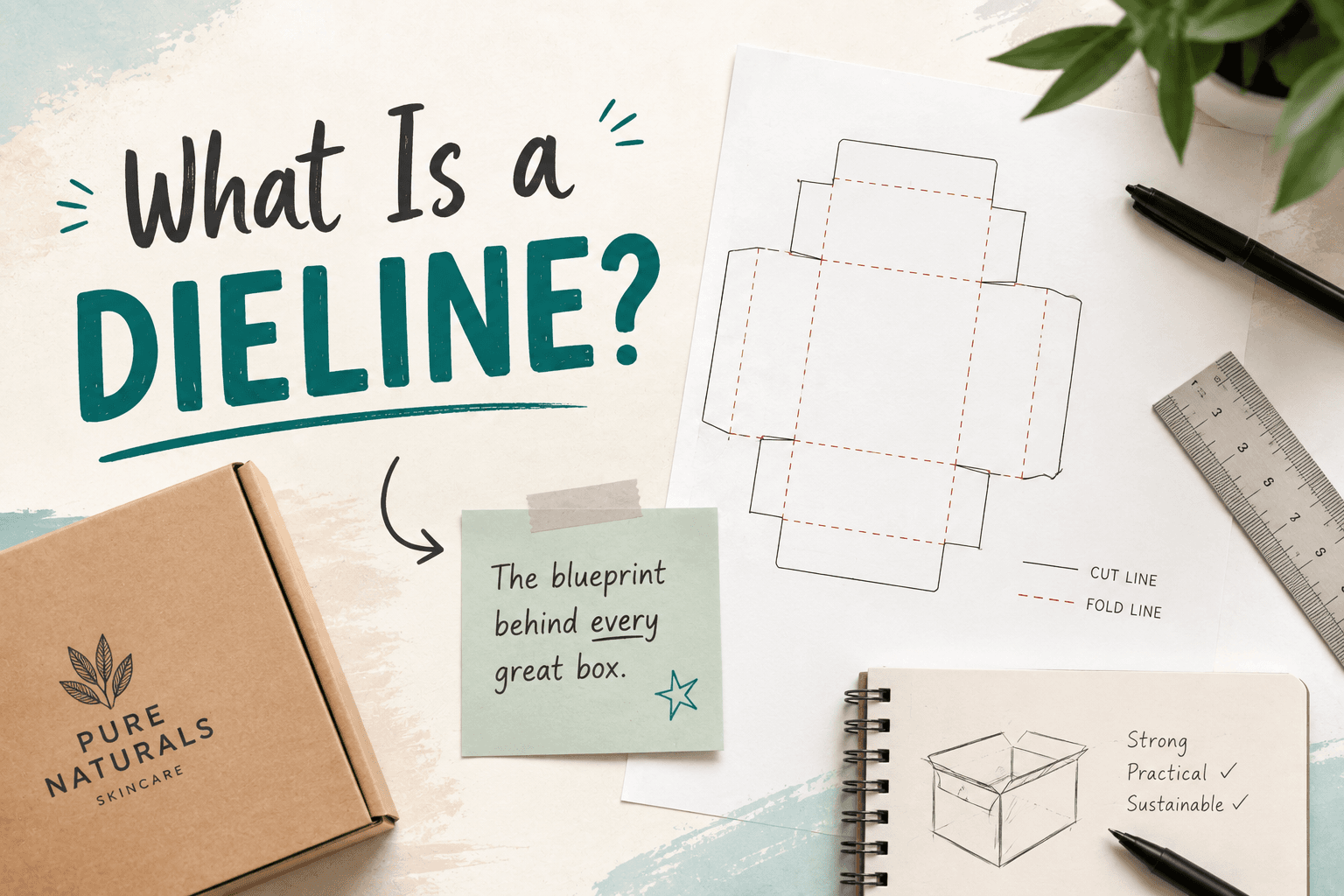
In the printing and packaging industry, that blueprint is called a dieline.
Understanding how to read a dieline — and knowing exactly what to look for when reviewing your digital proof — is the most critical step in the manufacturing process. A missed detail at this stage can lead to costly reprints, delayed launches, or boxes that simply don't fit your product.
In this guide, the prepress experts at Printline explain the anatomy of a dieline, what a digital proof is, and how to properly review your files before giving the green light for production.
- A dieline is the flattened, 2D structural blueprint of your packaging that shows exactly where the paper will be cut, folded, and glued.
- The Anatomy: Different colored or styled lines on a dieline represent different physical actions (e.g., solid lines for cutting, dashed lines for folding).
- The Digital Proof: This is the final digital document sent by your printer combining your artwork with the dieline.
- The Final Sign-Off: Approving a proof is a binding agreement. You must meticulously check sizes, spelling, barcode placement, and fold lines before hitting "Approve."
What is a Dieline?
Think of a dieline as the architectural floor plan for your packaging.
When your packaging is manufactured on our offset presses, we use a physical tool called a "die" (a custom-made wooden block with steel blades embedded in it) to stamp out the shape of your box from a large sheet of paperboard. The dieline is the digital file that tells our machinery exactly how to build that physical die.
Graphic designers use the dieline as a template, placing your brand's artwork, logos, text, and colors into the correct panels so everything lines up perfectly once the box is folded.
How to Read a Dieline (The Anatomy of the Lines)
When you look at a dieline, you will see a web of overlapping, color-coded lines. While every designer might use slightly different colors, the industry standard relies on these key elements:
- Cut Lines (Usually Solid Red or Black): These represent the exact outer edge of your packaging. This is where the steel blades will slice through the paper. Anything outside these lines will be cut off and thrown away.
- Fold / Crease Lines (Usually Dashed or Dotted Lines): These indicate where the paperboard will be scored and folded to create the 3D structure of the box.
- Bleed Lines (Usually Green or an Outer Boundary): Because paper can shift by a fraction of a millimeter during the high-speed cutting process, your artwork's background color must extend past the cut line. This extra color is called "bleed." It ensures your final box doesn't end up with unprinted white edges.
- Safe Zone (Usually an Inner Boundary): This is a margin just inside the cut and fold lines. All essential elements — like your logo, typography, and barcodes — must be kept inside the safe zone to ensure they aren't accidentally clipped or folded over an edge.
What is a Digital Proof?
Once your designer drops your artwork onto the dieline and submits it to Printline, our prepress department processes the file to ensure it is ready for our manufacturing equipment.
We will then send you back a Digital Proof (usually a high-resolution PDF).
The digital proof is exactly what it sounds like: it is the final, definitive preview of what your packaging will look like when printed. It merges your graphic artwork with our structural dieline.
Why Reviewing Your Digital Proof is Critical
At Printline, we have a saying: "If you approve it, we print it."
The digital proof is essentially a contract. When you sign off on a proof, you are giving the manufacturer the legal green light to create expensive printing plates, order raw materials, and begin mass production. If you receive your 10,000 boxes and realize there is a typo in your ingredients list, or that your logo is placed upside down on the bottom flap, the responsibility falls on you if it was approved on the proof.
To protect your investment, never rush the proofing process.
The Printline Checklist for Proof Approval:
Before you hit "Approve" on your digital proof, ask yourself (and your team) these vital questions:
1. Print and Fold (The "Dummy" Test)
Do not just look at the proof on your computer screen. Print the PDF out at 100% scale on your office printer. Cut it out with scissors and fold it along the dotted lines.
- Does the 3D shape look correct?
- Does your physical product actually fit inside?
- Do the flaps close properly without overlapping vital text?
2. Check the Artwork Orientation
When a box is flattened out, some panels are intentionally placed upside down on the dieline so they appear right-side up when the box is folded. (Use your paper dummy from Step 1 to verify that no text ends up upside down on the final box).
3. Inspect the Folds and Safe Zones
Is your logo crossing over a crease line? Is vital text too close to the cut line? Make sure everything important is safely within the boundaries.
4. Proofread Every Single Word
Printers do not proofread your packaging. We print the file exactly as provided. Have multiple people on your team read the proof specifically for typos, grammatical errors, regulatory compliance, net weight accuracy, and company contact info.
5. Verify the Bleed
Does the background color stretch all the way to the outer bleed line, or does it stop right at the cut line? (If it stops at the cut line, you risk having white edges on your boxes).
The Bottom Line
A beautiful, functional package starts with a flawless dieline and ends with a meticulous proof review. Taking the extra time to print, cut, fold, and heavily proofread your digital file is the single best way to ensure your packaging run is a massive success.
Ready to Bring Your Dieline to Life?
At Printline, our dedicated prepress team is here to support you. We supply precise, custom dielines for your structural needs and provide crystal-clear digital proofs so you know exactly what to expect.
If you have your artwork ready or need help figuring out the right box structure for your product, contact Printline today to get started!